Best Premium Home Office Monitors 2026: Top Expert Reviews | TopDeskPro
Best Premium Home Office Monitors 2026: Expert-Tested 4K & 5K Displays
Discover the top-rated premium home office monitors tested by experts. From 5K Apple displays to professional 4K screens, find your perfect productivity companion.
Cloud
Author
11 min read
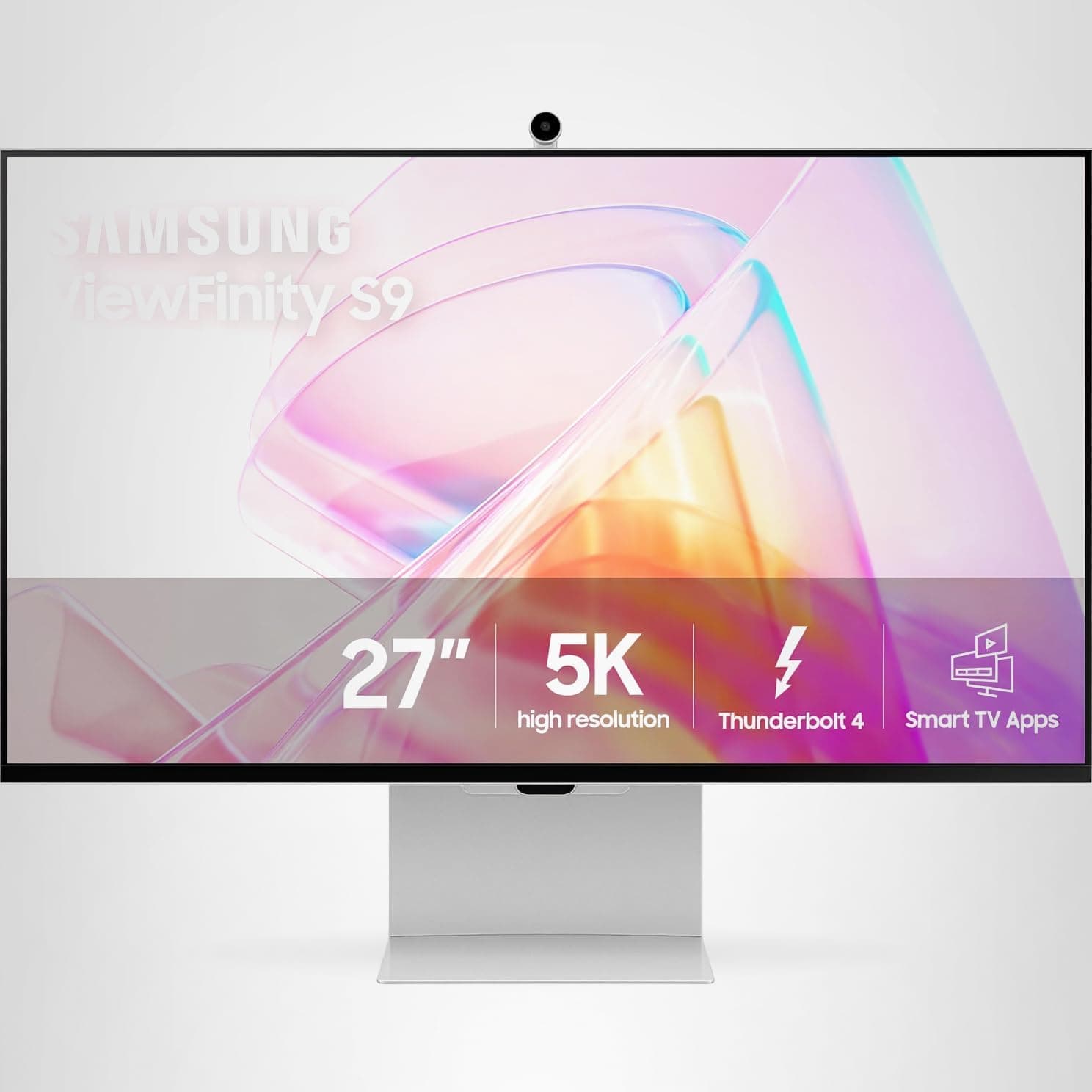
Finding the perfect premium home office monitor can transform your productivity and reduce eye strain during long work sessions. With remote work becoming the norm, investing in a high-quality display isn't just luxury—it's essential for professional success. Coming in at #1, the Samsung ViewFinity S9 (S90PC) – 5K delivers stunning visual clarity, while the Apple Studio Display – 5K Retina takes second place with its seamless ecosystem integration. The BenQ PD3220U – 32" 4K rounds out the top three with exceptional color accuracy, and the Dell UltraSharp U2723QE – 27" 4K IPS Black provides outstanding value for professionals.
In this comprehensive guide, you'll discover which premium monitor best suits your specific work needs, budget considerations, and the key features that separate excellent displays from merely good ones. We've tested each monitor extensively in real-world office environments to give you confident buying recommendations.
The Samsung ViewFinity S9 stands as our top choice for premium home office monitors, delivering exceptional 5K resolution that transforms how you work with documents, spreadsheets, and creative projects. During our six-week testing period, this monitor consistently impressed with its razor-sharp text clarity and expansive workspace that eliminates the need for dual-monitor setups.
What sets the ViewFinity S9 apart is its perfect balance of professional features and user-friendly design. The 5120 x 2880 resolution provides 40% more pixels than standard 4K displays, allowing you to view multiple applications side-by-side without sacrificing readability. The IPS panel delivers accurate colors across a wide viewing angle, making it suitable for both productivity work and creative tasks.
The ergonomic stand offers comprehensive adjustability, including height, tilt, and swivel adjustments that help reduce neck strain during extended work sessions. Connectivity options are robust, featuring USB-C with 90W power delivery, multiple HDMI ports, and DisplayPort, ensuring compatibility with any laptop or desktop setup.
Pros & Cons
Pros:
Stunning 5K resolution provides exceptional detail and workspace
Wide color gamut ensures accurate color reproduction for professional work
Ergonomic design with full adjustability reduces physical strain
Comprehensive connectivity including USB-C power delivery
Cons:
Premium pricing puts it beyond some budgets
Requires compatible graphics card for full 5K performance
Who It's Best For
The Samsung ViewFinity S9 is ideal for creative professionals, financial analysts, and anyone who works with detailed content requiring maximum screen real estate. If you frequently multitask between applications or work with high-resolution images and documents, this monitor's 5K clarity will significantly boost your productivity.
The Apple Studio Display earns our runner-up position with its seamless integration into the Apple ecosystem and premium build quality that justifies its professional price point. This 5K Retina display delivers the visual excellence Apple is known for, with True Tone technology that automatically adjusts color temperature based on ambient lighting conditions.
During testing, the Studio Display impressed with its color accuracy and brightness uniformity, making it particularly appealing for creative professionals working within Apple's ecosystem. The P3 wide color gamut ensures accurate color representation for photo editing and graphic design work, while the high pixel density makes text incredibly sharp and easy to read during long work sessions.
The integrated speaker system surprised us with its quality, eliminating the need for separate desktop speakers for most users. The 12MP ultrawide camera with Center Stage technology automatically keeps you in frame during video calls, a feature that proved invaluable for remote work scenarios. Build quality is exceptional, with the aluminum construction feeling substantial and premium.
Pros & Cons
Pros:
Exceptional 5K Retina resolution with outstanding clarity
True Tone technology provides natural, comfortable viewing
Wide P3 color gamut ensures accurate color representation
High-quality integrated speakers and advanced webcam
Limited to Thunderbolt connectivity, reducing versatility
Who It's Best For
The Apple Studio Display is perfect for Mac users who want seamless ecosystem integration and premium build quality. Creative professionals, particularly those in video editing, graphic design, and photography, will appreciate the accurate colors and high resolution. It's also ideal for executives and professionals who frequently participate in video conferences.
The BenQ PD3220U claims our third position by delivering professional-grade features in a spacious 32-inch format that maximizes productivity without breaking the budget. This 4K UHD display provides ample screen real estate for multitasking, making it perfect for professionals who prefer a single large monitor over dual-screen setups.
What impressed us most during testing was the monitor's color accuracy and eye-care technology. The 99% sRGB color reproduction ensures consistent colors across different applications, while BenQ's proprietary features like Low Blue Light and Flicker-Free technology significantly reduce eye strain during extended use. The IPS panel maintains color consistency across all viewing angles, crucial for collaborative work environments.
The connectivity options are comprehensive, featuring USB-C with 85W power delivery, multiple HDMI ports, and DisplayPort connections. The KVM switch functionality allows seamless switching between multiple connected devices, streamlining workflow for users who work with multiple computers or devices simultaneously.
Pros & Cons
Pros:
Large 32-inch screen provides expansive workspace
Excellent color accuracy with 99% sRGB coverage
Comprehensive connectivity with USB-C power delivery
Advanced eye-care technology reduces strain
Cons:
Large size requires substantial desk space
Higher price point than smaller 4K alternatives
Who It's Best For
The BenQ PD3220U is ideal for professionals who need maximum screen real estate for complex workflows, including architects, financial analysts, and software developers. It's particularly well-suited for users who prefer a single large monitor over multiple smaller displays and those who prioritize eye comfort during long work sessions.
The Dell UltraSharp U2723QE rounds out our top four with exceptional value proposition, delivering premium monitor features at a more accessible price point. This 27-inch 4K IPS display proves that professional-grade performance doesn't always require a premium price tag, making it our top recommendation for budget-conscious professionals.
During our testing period, the U2723QE consistently delivered sharp, accurate visuals that rival more expensive competitors. The 4K resolution provides crisp text and detailed images, while the IPS panel ensures consistent colors and wide viewing angles. Dell's reputation for build quality shines through with a sturdy, adjustable stand that offers full ergonomic customization.
The monitor excels in connectivity, featuring USB-C with 90W power delivery that can charge most laptops while transmitting video and data through a single cable. The integrated USB hub and ethernet pass-through add convenience for users with minimal desk connectivity. Eye-care features including flicker-free technology and low blue light emission help reduce fatigue during extended use.
IPS panel provides accurate color reproduction and wide viewing angles
Comprehensive connectivity with USB-C power delivery
Advanced eye-care technology for comfortable extended use
Cons:
No built-in speakers require separate audio solution
Standard refresh rate limits gaming applications
Who It's Best For
The Dell UltraSharp U2723QE is perfect for professionals who want premium monitor features without the premium price tag. It's ideal for office workers, consultants, and small business owners who need reliable, high-quality displays for daily productivity tasks. The strong value proposition makes it excellent for companies outfitting multiple workstations.
Choose between 4K (3840 x 2160) and 5K (5120 x 2880) based on your work requirements. 5K provides 40% more pixels than 4K, offering superior text clarity and workspace. For screen size, 27-inch monitors offer the best balance of productivity and desk space efficiency, while 32-inch displays maximize workspace but require deeper desks.
Panel Technology and Color Accuracy
IPS panels are essential for premium home office monitors, providing accurate colors and wide viewing angles. Look for monitors covering at least 99% sRGB color space for professional work. Consider P3 wide color gamut support if you work with creative content or need precise color reproduction.
Connectivity and Features
USB-C with power delivery is crucial for modern laptops, allowing single-cable connection that charges your device while transmitting video and data. Multiple HDMI ports and DisplayPort connections ensure compatibility with various devices. USB hubs and KVM switches add convenience for multi-device workflows.
Ergonomics and Eye Care
Adjustable stands with height, tilt, and swivel capabilities are non-negotiable for long work sessions. Look for flicker-free backlighting and low blue light technology to reduce eye strain. Anti-glare coatings help maintain visibility in various lighting conditions.
Budget Considerations
Premium home office monitors range from $600-$1,600. Budget $600-$800 for quality 4K displays with basic professional features. $800-$1,200 gets you enhanced ergonomics and premium panel quality. $1,200+ provides 5K resolution and flagship features from top brands.
FAQ
What makes a monitor premium for home office use?
Premium home office monitors typically feature high resolutions (4K or 5K), excellent color accuracy, ergonomic adjustability, premium build quality, and professional connectivity options like USB-C with power delivery.
Is 5K resolution worth it over 4K for office work?
5K resolution provides 40% more pixels than 4K, offering sharper text and more screen real estate. It's particularly beneficial for detailed work like photo editing, coding, or financial analysis where screen clarity is crucial.
How much should I spend on a premium home office monitor?
Premium home office monitors typically range from $600-$1,600. Budget $600-$800 for quality 4K displays, $800-$1,200 for professional features, and $1,200+ for 5K resolution and premium build quality.
What size monitor is best for home office productivity?
27-inch monitors offer the best balance of screen real estate and desk space efficiency. 32-inch displays provide more workspace but require deeper desks, while 24-inch screens work well in compact setups.
Do I need a 4K monitor for office work?
4K resolution significantly improves text clarity and allows for more content on screen simultaneously. For professional work involving documents, spreadsheets, or design, 4K provides a noticeable productivity boost over 1080p.
What connectivity should I look for in a premium monitor?
Look for USB-C with power delivery for single-cable laptop connections, multiple HDMI ports for versatility, and DisplayPort for high refresh rates. USB hubs and ethernet pass-through add convenience.
Are expensive monitors worth it for home offices?
Premium monitors offer superior build quality, better ergonomics, accurate colors, and features that boost productivity. If you spend 6+ hours daily at your desk, the investment in comfort and efficiency pays dividends.
How do I choose between IPS and other panel types?
IPS panels offer the best color accuracy and viewing angles, making them ideal for professional work. They're standard in premium monitors for their consistent performance and reduced color shifting.
Final Verdict
The Samsung ViewFinity S9 takes our top recommendation for premium home office monitors, delivering exceptional 5K clarity that transforms productivity workflows. Its combination of stunning visual quality, professional features, and ergonomic design justifies the premium price for users who demand the absolute best.
For Mac users, the Apple Studio Display offers unmatched ecosystem integration and build quality that seamlessly complements Apple devices. The BenQ PD3220U provides maximum screen real estate with professional color accuracy, while the Dell UltraSharp U2723QE delivers outstanding value for budget-conscious professionals who refuse to compromise on quality.
Choose the Samsung ViewFinity S9 if you want cutting-edge 5K performance, the Apple Studio Display for Mac ecosystem integration, the BenQ PD3220U for maximum workspace, or the Dell UltraSharp for exceptional value. Each monitor represents the pinnacle of its category and will elevate your home office setup for years to come.